
Sygic GPS Mod Apk 26.5.4-118418 Cracked + Data + MAPS
- Current Version: 26.5.4-118418
- File size: 110 MB
- Memorize: www.ReXdl.com
Sygic GPS Mod Apk
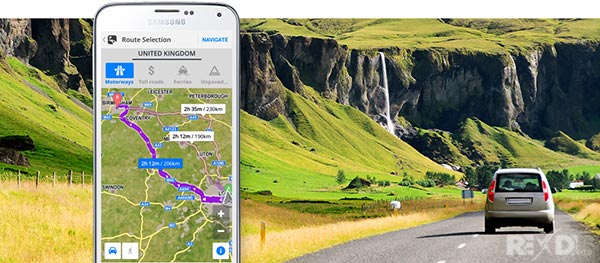
Sygic GPS Navigation & Maps is innovative GPS navigation app with monthly-updated offline maps and with precise live traffic & speed camera alerts, both updated in real time. It‘s trusted by more than 200 million drivers worldwide. Offline 3D maps are stored on your phone for GPS navigation without an internet connection. We update the maps multiple times per year for free, so that you can always rely on Sygic GPS Navigation.
NAVIGATE ANYWHERE, EVEN WITHOUT AN INTERNET CONNECTION
- 3D Offline maps of all countries in the world, from TomTom and other providers
- Free map updates multiple times per year
- Voice-guided GPS navigation with precise directions and spoken street names
- Millions of interesting Places (POI)
- Pedestrian GPS navigation with walking directions and tourist attractions (POI)
- Satellite Maps – search for your target address, point of interest or favorites in the satellite view.*
- Customize your navigation arrow. Try everyday car, van or even formula.
ESCAPE THE TRAFFIC
- Avoid traffic jams with the most accurate real time traffic information with data collected from more than 200 million users worldwide*
ANDROID AUTO CONNECTIVITY
- Just connect your phone to your car’s screen and stay focused on the road
- You can use your car’s touchscreen, knobs, or buttons to control the app
STAY SAFE
- Advanced safety features make driving in unfamiliar territories easier
- Speed limit warnings show you the current speed limit and the upcoming speed limit changes
- Dynamic Lane Assistant guides you into the correct lane
- Head-up Display (HUD) projects navigation onto the windshield of your car, making driving at night safer
- Sign recognition detects speed limits from traffic signs as you drive
- Dashcam records the road ahead and automatically saves video in case of an accident
- Real View Navigation is an augmented reality feature for even better and safer driving experience
- Cockpit shows you the real time performance of your car.
- Real time route sharing lets you share your estimated time of arrival & current position on a map*
- Wrong-way warning (in partnership with Bosch)**. If you are driving in the wrong way or someone is driving in the opposite direction, we will warn you.*
SAVE MONEY ALONG YOUR ROUTE
- Park easily with parking place suggestions and live info about prices and availability*
- Set your fuel type and fill up for the best price with live information about fuel prices*
- Avoid speeding tickets with Speed camera warnings*
- Save money on roaming charges with offline maps
Sygic GPS Mod Apk
Do you want to find out how it feels to have Premium+? Try our 7-day trial for free and discover all Premium+ features. After that, you can decide if you want to prolong your subscription or use basic features only.
Should you have any questions, please visit sygic.com/support. We are here for you 7 days a week.
If you like our app, please leave a review or spread the word at sygic.com/love. Thank you for your support.
*Please note that this feature requires an internet connection.
Note: Sharing videos from Dashcam is forbidden by law in these countries: Austria, Belgium, Luxembourg, Switzerland, Slovakia, Spain.
Note 2: Dashcam, Traffic Sign Recognition, and Real View are part of the new feature SmartCam. SmartCam merge all camera features into one. The SmartCam is a part of our Premium+ subscription.
**Wrong-way driver feature is available in Sygic GPS Navigation for Android, version 22.2. or higher.
More information about features can be find in glossary: https://www.sygic.com/what-is
By installing, copying, or using all or any portion of this software you accept all the terms and conditions of this agreement: https://www.sygic.com/company/eula
WHAT’S NEW:
Sygic GPS Mod Apk
Related posts:
 MAPS.ME Offline maps MOD APK 17.6.71940 (Full) Android
  Maps & GPS Navigation OsmAnd+ APK 5.4.3 Android
  Navitel Navigator GPS & Maps 11.9.580 Full Apk + Data for Android
  AVG AntiVirus PRO MOD APK 25.11.0 (Cracked)
  WeatherPro Premium 4.8.6 Cracked Apk + Mod for Android
  Smart IR Remote – AnyMote 4.6.9 APK Cracked for Android
It works well at first but after a few days it doesn’t work. requires internet connection.
WORKS!
¡FUNCIONA 100%!
Thanks , Very very well … I wait on new version 🙂 🙂 . I like your site . Czech Republik
Hibátlan, Köszi a feltöltést 🙂
Thank’s very much! It works perfect! ⭐⭐⭐⭐⭐
You guys do the best coding
But this program has changed it wont even load. Its not on your end not sure whats going on.
Thanks a lo
No traffic
Jest już Sygic 22.2 1
Kiedy się ukarze
the version 22.1.2 is not stable. I tried installing in my car’s head unit, it opens and then crashes immediately. please rectify.
update to new version
try again
Sygic 18.4.4 (Full) ..work perfectly .. thanks
Thank you very much it works good.
But real time traffic not working.
Anyway if anyone looking for more simple install working app?
Please try ‘Offline maps and Navigation’.
You can download from Play store, it’s free and same as Sygic.
It use same interface and same maps real time traffic any other options all free.
Also, world maps free too, all same as Sygic.
Just free version, but NO limitation.
Friend you have to do all very carefully.
I will try to do my best to explain.
Please follow detailed my instructions.
1. Delete all files of sygic included the ‘com.sygic.aura’ folder.
(Android/data/files/com.sygic.aura)
2. Install Sygic from Play store.
Download all maps you want.
-Go to Folder ‘android/data/files/com.sygic.aura/maps
Copy ONLY the folders which you have downloaded from the app.
For example: I have downloaded the map of Netherlands. The folder name of this country is like: ‘nld.ta.2018.03’. Copy ONLY this folder to any area in your phone to use them later.
3. Delete the official sygic app which you have downloaded from the google play store.
4. Install the apk you got from the link above. Open the app and close. (It is important to open the app because once you have opened the app, there will be added some files in the directory)
4. Go to android/data/files/com.aura.sygic/ and delete ALL FILES
Copy the files you have placed in an other area tho this folder (see step 2)
Open the app and enjoy!
Thank you so much for clear cut instructions. Super easy :))
Many Thanks,
I followed your instruction and so far works like charm.
I got Samsung S20FE and my folder was ” \Internal storage\Android\data\com.sygic.aura ”
Thanks Ash
Hello friend. All add-ons are included;
– Head-Up Display
– Real View Navigation
– Dashcam
If you have any other questions, do not hestitate to ask them friend.
I cant get neither the Dashcam nor the Real View Navigation to work
Error…. “SmartCam.. sorry, something went wrong”
Any clues to rectify this problem?
Hello friends,
Firstly Thanks for this mod. I am very appreciated. Thanks developper. If anyone have problems with installing you could contact me. I wil do my best to help out.
The APK is all included. Only what is missing, is the ‘real-time Traffic’. Does anyone now how to fix this? How can I Include this service?
Thank you all, we make it easy for each other.
Its working perfect !
dont read alot ! just listen to me
Download full sysic and Map from google store
Go to android/data/sygic/ copy folder “MAP” to another location
unsitall all sysic
>>> install rexdl sygic >> paste “MAP” to android/data/sygic/ copy
>>> working with me : android 7
Thanks for sharing such a wonderful cracked app. I spent almost a 1 hr to figure out how it works. Anyway, I like to add that the data package missing file folder is very important. We need to manually create a folder, ‘files, to contain the 3 files that are: Android, Map and Res so that the app can launch properly —-> com.sygic.aura/files/
Just simply do not connect to the internet. install the apk file provided by rexdl. The com.sygic.aura/files/ folder will be created as soon as the app has been opened once. With a file explorer you can now copy and replace the Android, Maps and Res folder within the com.sygic.aura/files/ folder. In an earlier stage you have already downloaded the preferred roadmaps. These roadmap folders(which look like this: cze.ta.2017.03) can now be directly copied into the Maps folder. Restart The Sygic app and enjoy.
Works great, thank you! You have to:
1) Download map with original app from Google Play Store, save it (I did it on my computer) and paste it in cracked “Maps” replace the one from there,
2) Create folder “files” because it doesn’t exist! Something like this: com.sygic.aura/files/…and then the rest.
Working perfect to LG G4 Dual.
please someone who can kindly explain to me how do I install it?
Uninstall the previous version and delete the folder Sygic if exist.
1a. Unzip and copy Sygic folder (basefolder archive) to the root folder (internal storage or SD card)
1b. Unzip and copy “Android”,”Maps”,”Res” from Sygic folder (basefolder archive) to Android/data/com.sygic.aura/files/put here Android,Maps,Res (internal storage or SD card (create, if not exists)
Use MapDownloader to download your region country.
2a. Copy your downloaded maps to folder SDCard/Sygic/Maps/~put maps here~
2b. Copy your downloaded maps to folder Android/data/com.sygic.aura/files/Maps/~put maps here~
Install Patched apk.
Start app, skip email and Enjoy!
Greetings everyone!
How to use an external camera on Sygic to use the Real-time function?
Because I’m using Sygic in a Central Multimidia in the car (not smartphone); Thank you
Hi, I created create file folder after com.sygic.aura everything works fine but the Real View Navigation does’t work. Can you help me?
Hi.
Everything works well except for Real View Navigation. There is no error but the camera does not work. The route is visible but the background is black and there is no camera screen . What is wrong?
ty
1. First download the one in play store, launch and download any map you want.
2. Open android/data/com.sygic.aura/file
3. Copy map and save it to any preferable location.
4. Uninstall the one from play store.
5. Install the cracked one and open
6. Replaced the map from the cracked one folder com.sygic.aura for the saved one.
7.now copy content on com.sygic.aura to
android/data/com.sygic.aura/file
Enjoy
Finally, good instructions to thank! 🙂
no working, just detecting country and RETRY, can not download MAP CALIFORNIA.
How can i fix it? Thanks
data package missing file folder, so like this com.sygic.aura/file/
you need create file folder after com.sygic.aura
Hey, I have a problem I can start the app but as soon as it launch it detect the country but it keep trying and trying again without founding my country… So I cannot start the app itself bc of this.
data package missing file folder, so like this com.sygic.aura/file/
you need create file folder after com.sygic.aura
Hallo, what is the newest Map downloader for TomTom. I been searching but ending up with 06/2016. Aren’t there any newer ones? Thank you!
does not work 🙁
I cannot download any map – it shows just loading loading – but nothing happened – the app itself got installed & also working
why is here in the download only “Vatican” map included ?
All other is missing …… nobody needs vatican map … pls upload other maps too or tell me how to fix the problem that map download not working
THX 🙂
hello
no problem
please edit content.info file /sygic/maps
With the Windows Notepad
Delete the phrase: maps=TA:WORLD:2015.06
Then save the file
thank you
Hello, I have the same problemen. Can I get more details.
Thanks for uploading
same here man plz help !
Even the new one it’s not working
Can’t download maps just hangs.
Help pz
go play store download sygic trial version, and download your map, after go in com.sygic.aura/file/map/ ,, you will see map folder inside, and copy your map to patch data , after uninstalle trial version sygic, first move downloaded patch data(include your map) to android/data,,,after install patch sygic.apk that can 100%work
is real view working ?
This is not Version 17.2.2, it’s 17.2.1
yes, New version has a problem
Please wait until the release of the Healthy version
THANKS!
Thanks for deleting my Post without answering.
Does this “Emulated/0/” folder already exist or does it have to be created on the device?
“Android/Data/com.sygic.aura/files/” Also does not exist on my device;
Thank you
The right path is internal storage/android/data/ (create this file )com.sygic.aura/(and this file)files/paste here Android Maps Res
When you install the apk it creates the file com.sygic.aura in Android / Data in the internal memory, when you open the file explorer you have an Android folder, it is there.
Then when you launch sygic it asks you if you want it to be on the internal memory or on your external sdcard if of course you have an sd external card, if you choose the sd external card you will have 2 files com.sygic.aura, One in the internal memory and one in the sd external card, according to what you chose you put the maps either in the internal or external memory.
.Hello, dear friend, thank you very much, for this, but I have problem with 17.1.11-14 version, when I try to find an address, after 3 times the system is log out, and I start again, start finding, and after 2 or 3 times of finding address its turn off,
thanks for your help,
Have you restarted the smartphone
can 3d buildings (in the map)available of the pakistan????
kindly inform me
Is it available on my country “BANGLADESH”?
whoah this blog is magnificent i love reading your articles.
Keep up the great work! You know, lots of persons
are hunting around for this information, you can help them greatly.
” FURTHER RECTIFICATION”
If you want more “MAPS” you must delete the “MAPS” you have in the folder “maps” of the BeonRoad folder and download another card.
A solution for the cards,
intall “gps navigation” which is on Google player store, (it is exactly the same as Sygic)
it proposes to you the first launch to choise on card internal or external, choose internal
Download the cards of your Choice,
Then go to the internal map and open the “BeonRoad” folder and you will find the “maps” folder with the map you download, copy it and paste it into the “maps” folder of Sygic, these are the same maps .
If you want more cards you must delete the card you have in the folder “maps” of the BeonRoad folder and download another card.
Hello,
installation OK but i was unable to find how to download maps and no way to get sgcmapdownloader17 and how to use it. Thank you for your help.
Download both files APK and data file
“APK” on root of your debvice
“APK” install it on your device.
In “Emulated/0/” now is a file Android/Data/com.sygic.aura/files/
Copy downloaded files data files in the files Android/Data/comsygic.aura/files and overwrite the directories and files
Copy the downloaded countries in the directory Android/Data/comsygic.aura/files/Maps
And it is working on my Samsung S7 Edge G835F
Setup:
“APK” install it on your device.
“Sygic” folder “Emulated/0/” copy into.
Enter the Sygic
Doesn’t work in my case as discrypted above.
Sygic works when you act as follows:
1. download the files
2.“APK” install it on your device.
3. in folder “Emulated/0/” now there is a folder Android\data\com.sygic.aura\files.
4. copy all downloaded files in the concerned folders and overwrite them.
5. put the downloaded countries in the folder maps.
It works like a charm on my Samsung S7 edge SG935F
IT´S RUN
Install on android 6.0.1:
1) Copy to main storage “APK” file (“Emulated/0/” == main directory of your smartphone!)
2) Instal “APK” file
2) Copy unzipped “Sygic” folder to smartphone main storage!
3) Restart smartphone
4) Download maps from “sgcmapdownloader17.exe” (download from google)
5) Copy maps to folder “Sygic/Maps”
6) Enjoy
(Tested on Lenovo P2 – 03.03.2017)
———————————————-
Inštalovanie na android 6.0.1 (slovak, czech):
1) Skopíruj do hlavného adresára “APK” súbor (“Emulated/0/” == hlavný priečinok tvojho telefónu)
2) Nainštaluj “APK” súbor
2) Skopíruj rozbalený priečinok “Sygic” do hlavného adresára tvojho telefónu!
3) Reštartuj telefón
4) Stiahni si mapy cez program “sgcmapdownloader17.exe” (vygúgluj alebo stiahni z uložta)
5) Skopíruj mapy do priečinka “Sygic/Maps”
6) Uži si navigáciu
(Testované na Lenovo P2 – 03.03.2017)
to the app works you need download the map e past into the app directory “Android>data>com.sygic.aura>files>Maps”. You can download maps and voices by the “sgcmapdownloader17.exe” (google it).
For me, this version don’t Warning fixed speedcams, so it is useless
aqui não detectou país :'(
você precisa baixar manualmente o mapa e colar na pasta “Android>data>com.sygic.aura>files>Maps”. tem um programa chamado “sgcmapdownloader17.exe” que baixa mapas automaticamente, atualizados, e vozes também (procure pelo google).
Essa versão não alerta radares, eles aparecem no mapa, mas não faz nenhum tipo de som, é um bug do crack.
It work perfectly everywhere.Thank you!
So far this is the best site for direct link downloads and modded apps that i ever seen and rexdls keep up with it! thanks for everything .
Thanks!
Rexdl is the best android app site i ever came across. no bloody popups, redirections and stupid fake pages. thumbs up
now its working fine but i cant install a maps > empty
hi dear
i do this step
“APK” install it on your device.
“Sygic” folder “Emulated/0/” copy into.
Enter the Sygic.
but when i start the sygic in my phone
it goes to :welcome pleas download a map for offline use.
and stock here
what should i do?
my phone: samsung A5 – Androide 6.0.1
please help me ASAP
to the app works you need download the map e past into the app directory “Android>data>com.sygic.aura>files>Maps”. You can download maps and voices by the “sgcmapdownloader17.exe” (google it).
For me, this version don’t Warning fixed speedcams, so it is useless
it works perfectly for Algeria and Tunisia
thank you
CAn someone pls email me the activation key/product key for Sygic GPS Navigation version 16.2.11 for my Samsung S5
hi how dawnload iraq map ??????????
Hi. Can somebody help me pls? 🙂 Rhe download completed apk is installed. But when im trying to start the application, it stops with the white starting Syguc screen. Help me please 🙂
works perfect from Spain!
What Happened to JAPAN?
gracias
Muchas gracias por el aporte! Funciona a la perfección!!!
Thank you, it’s working perfectly (y)
Can u please provide with working INDIA maps data.
Thanks